Programming tricks tips, for programming languages like vb.net, python ,javascript, android framework
Monday, January 19, 2015
SamudBunShe version 1.27
SamudBunShe Pro version 2.5
Thursday, January 15, 2015
How to sort string in javascript
example If you have an array of string, and you want to sort it.how to do ?
1. simple array
var pets = ['cat','snake','dog'];
pets.sort(function(a, b){
if (a > b)
return 1;
else if if (a.n == b.n)
return 0;
else
return -1;
});
your data will be sort like this
- cat
- snake
- dog
2. table data
if you have data like this table, you want to sort by name
| name | age |
| sammy | 12 |
| tony | 51 |
| lucy | 20 |
// fill in array
var ages_list = [];
ages_list.push({"name":"sammy","age",12});
ages_list.push({"name":"tony","age",51});
ages_list.push({"name":"lucy","age",20});
//sort it
ages_list.sort(function(a, b){
if (a.name > b.name)
return 1;
else if if (a.name == b.name)
return 0;
else
return -1;
})
this is result of sort
| name | age |
| lucy | 20 |
| sammy | 12 |
| tony | 51 |
Thursday, January 8, 2015
Detect timezone in javascript
For now I'm working on a project, I need to display the value of date on screen. The value I received , I get it as datetime in UTC value. I need to display as local timezone.
var time_value = 1391187600000;
I check the current timezone by use this method getTimezoneOffset
It is a method of object date in javascript, it return number of minutes different from UTC.
This is what I use
var hplus = ((new Date().getTimezoneOffset()) / 60) * -1);
if (isNaN(hplus)) hplus = 0;
explanation:
new Date()
- Need to use method of object date, then create one
new Date().getTimezoneOffset()
- Receive -420 (minutes) from this method
(new Date().getTimezoneOffset()) / 60
- Need hour so I divided it by 60, in my sample I will get 7
(((new Date().getTimezoneOffset()) / 60) * -1)
- As I received UTC, to display I will add 7 to UTC hour, I prefer to get +7
- If you are at Arizona in USA, you will received -7
Wednesday, January 7, 2015
Check type of varaiable in javascript
In javascript, you can get the type of variable in javascript with this function:
typeof(var)
example:
var a = 1;
>> typeof(a)
- return number
var b = "hello";
>> typeof(b)
- return string
var c = new Date();
>> typeof(c)
- return object
the sample of useful of this:
var man = {"name":"tom", "age" : 12};
if you want to display it according their type in table.
By String should align left, and number align right.
var html_table='<table><tr>';
for (var each in man){
html_table+='<td>'+each+'</td><td align="'
if (typeof(man[each])=='number') html_table+='right';
else if (typeof(man[each])=='string') html_table+='left';
html_table += '">'+man[each]+'</td>';
};
html_table+='</tr></table>';
after run, you will see the result like this
| name | tom |
| age | 12 |
Tuesday, January 6, 2015
Regular expression in javascript
example of the use, if you want to extract "my name" from this string '"name":"my name"'var ret = '"name":"my name"';
var rets = ret.match(/name[\\'"+]:[\\'"+]([^\0'"]+)/i)||[,];
you will get rets[0] = "name":"my name"
and you will get rets[1] = "my name"
explanation:
.match is the method of string type. this is actual structure .match(//i)
i -> indicate that we don't care the case
so if you have string = '"Name":"my name"' or '"nAme":"my name"' it will also work
now look at this regular expression
name >> begin of search
- we want to find the text that has "name" at the begin of the search
- your name : >> this will work
- your nnme : >> this will not work
[\\"'+] >> represent next characters after above word
- next character must be \ " or ', at least 1
- your name" : >> this will work
- your name: >> this will not work
- it can be more than 1
- your name"' :>> this will work
- your name\" :>> this will work
- your name": >> this will work
- your name""x >> this will not work
[\\"'+] >> represent next characters after above word
- next character must be \ " or ', at least 1
- your name":" >> this will work
- your name: " >> this will not work
- it can be more than 1
- your name"':" :>> this will work
- your name\":\" :>> this will work
([^\0'"]+) >> represent group of text that after above word
- it can be any character but not ascii 0 and not " and not '
- your name":"sss" :>> this will work
- your name":"sss :>> this will not work
- it can be more than 1
- your name":"s" :>> this will work
- your name":"sss" :>> this will work
let's look at the function method
ret.match(/name[\\'"+]:[\\'"+]([^\0'"]+)/i)
>> this will return array if match
>> and return null if not match
ret.match(/name[\\'"+]:[\\'"+]([^\0'"]+)/i) || [,]
>> always return array, if match will return matching array
>> if not match you will get empty array of 2 index
Friday, January 2, 2015
Happy New Year 2015
Happy New Year 2015
I wish all the reader the happiness, More trick and hint will coming.
regards
Monday, December 1, 2014
SamudBunShe Pro version is release.
Now SamudBunShe Pro version is release. You may wonder what's different between Pro version and Free version.
| Free | Pro | |
| Country | Only Thailand | Worldwide |
| Backup | Yes | Yes |
| Restore | No | Yes |
The only different now between them are Free version is available only in Thailand, while Pro version is for worldwide.
Pro version has the restore and backup function, while Free version has only backup function.
The restore function is used for open and use the data from the backup function. So it will very helpful if you have make a big mistake, or you want to open the previous backup.
If you have a free version before, you make the backup from your free version. Once you install the Pro version, you go to restore function and browse the backup from free version.
After that you can continue to use your Pro. Or you can start from scratch.
Saturday, November 8, 2014
SQLite The free and powerful database for small usage with vb.net
Sqlite The free and powerful database for small usage
Are you looking for free database that you can use in your application ?
I would like to suggest your "SQLite" (download link) , after you install you will have this file "System.Data.SQLite.DLL" , this is all you need.
let's start.
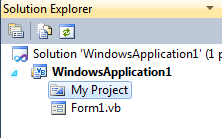
1) you create normal window application., you will come to this screen look on your right.2) click on "show all files" icon
4) select "Browse" tab then select your file "System.Data.SQLite.DLL"
5) you will have reference appear., now your project is ready to use.
6) first , we need to create database. This is function to do.
7) after you run this function, you will have new file create (with zero byte because you have nothing yet)
8) second, we will have to create database structure with tables.
- we create connection (this function will be used for every time you want to connect to database)

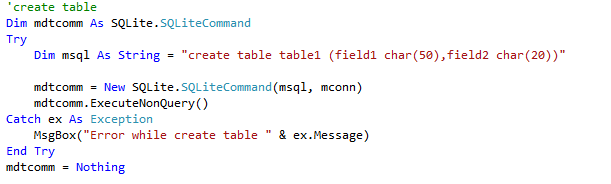
- now we are ready., so let's create table (see more detail about field type here)

- next we insert some data
- now we have data ready in table,

Wednesday, March 9, 2011
Using style sheet to make text center with HTML
in style sheet (.css) file , you define class like thisdiv.div_center{
width:800px;
left:50%;
margin: 0px auto 0px auto;
}
to use like this
...
<body>
<div class = "div_center">
... center stuff..
</div>
</body>
Tuesday, March 8, 2011
WPF Datagrid and datatable in vb.net
To assign datatable to WPF datagrid we simple use property "defaultview".
sample in vb.net:
dim mdt as new system.data.datatable
mdt.columns.add("Column1")
mdt.columns.add("Column2")
mdt.rows.add("id 1", "text 1")
mdt.rows.add("id 2","text 2")
mdt.rows.add("id 3","text 3")
mydatagrid.itemssource = mdt.defaultview
Monday, March 7, 2011
Important of the log file in programming
What's log file?
Log file is the file program create during it operation and process, this log file is very useful for developer to check and debug the big program.We can integrate log file very easy through the system.file.io
Sample in vb.net
Private mlogst as system.text.stringbuilder
'function to create log file.
Sub writelog(mlog as string)
Dim logfile as string = "c:\temp\log.txt"
Try
'mean there is previous log that didn't write, so we write it.
IO.File.AppendAllText(logfile,mlogst.tostring)
'after write we empty it.
mlogst = nothing
'write the log information..
IO.File.AppendAllText(logfile,mlog)
Catch ex as exception
'if there is error while write the log this time
If mlogst is nothing then mlogst = new system.text.stringbuilder
mlogst.apppend(mlog)
End sub
//// to use…
Sub main
Writelog ("starting program…")
Do …..
Writelog ("doing stuff…"
Do …
Writelog ("ending program..")
End sub
You can write more useful information , like the datetime of the log occur , current user that use this log..
IO.File.AppendAllText(logfile,mlog)
So you write as..
Io.file.appendalltext(logfile,string.concat(now , " " ,mlog))
You should have the log like this..
07-03-2011 6:35:01 PM starting program..
07-03-2011 6:35:02 PM doing stuff..
….
07-03-2011 6:36:01 PM ending program..
'mlogst is the cache in case that file is busy / can't write the information
'we can keep and write it later.
If not mlogst is nothing then
'mean there is previous log that didn't write, so we write it.
IO.File.AppendAllText(logfile,mlogst.tostring)
'after write we empty it.
mlogst = nothing
End if
'write the log information..
IO.File.AppendAllText(logfile,mlog)
Catch ex as exception
'if there is error while write the log this time
', we keep in the mlogst for write next time.
If mlogst is nothing then mlogst = new system.text.stringbuilder
mlogst.apppend(mlog)
End try
End sub
//// to use…
Sub main
Writelog ("starting program…")
Do …..
Writelog ("doing stuff…"
Do …
Writelog ("ending program..")
End sub
You can write more useful information , like the datetime of the log occur , current user that use this log..
IO.File.AppendAllText(logfile,mlog)
So you write as..
Io.file.appendalltext(logfile,string.concat(now , " " ,mlog))
You should have the log like this..
07-03-2011 6:35:01 PM starting program..
07-03-2011 6:35:02 PM doing stuff..
….
07-03-2011 6:36:01 PM ending program..
Sunday, March 6, 2011
Saturday, March 5, 2011
Best way to use string in vb.net programming
This is the very useful object that you can manage your string, especially when you want to concatenate your string in the loop.
Old:
Dim I as integer
Dim s as string
For I = 1 to 10000
S = s & "concat string"
next
new:
dim I as integer
dim s as new system.text.stringbuilder.
for I = 1 to 10000
s.append("concat string")
next
You will see a lot different when you have very long loop.
See more information here.
Thursday, March 3, 2011
the function equivalent to "doevent" in vb 6
The function equivalent to "doevent" in vb 6
In vb6 programming"doevent" is function that useful when you want to update your text on your form while you are using loop. unfortunately that this function is not exist in vb.net. but we can use this code below to have similar result.
Private Delegate Sub EmptyDelegate()
Public Sub DoEvents()
System.Windows.Threading.Dispatcher.CurrentDispatcher.Invoke(System.Windows.Threading.DispatcherPriority.Background, New EmptyDelegate(AddressOf mfunction))
End Sub
Private Sub mfunction()
'just leave it empty...
End Sub
sample to use :
you want to update your text during the loop
dim i as integer
for i = 1 to 1000
label1.text = "this is label in loop ..." & i
DoEvents()
next
How to create your blog for free !
How to create your blog for free
Sep by step
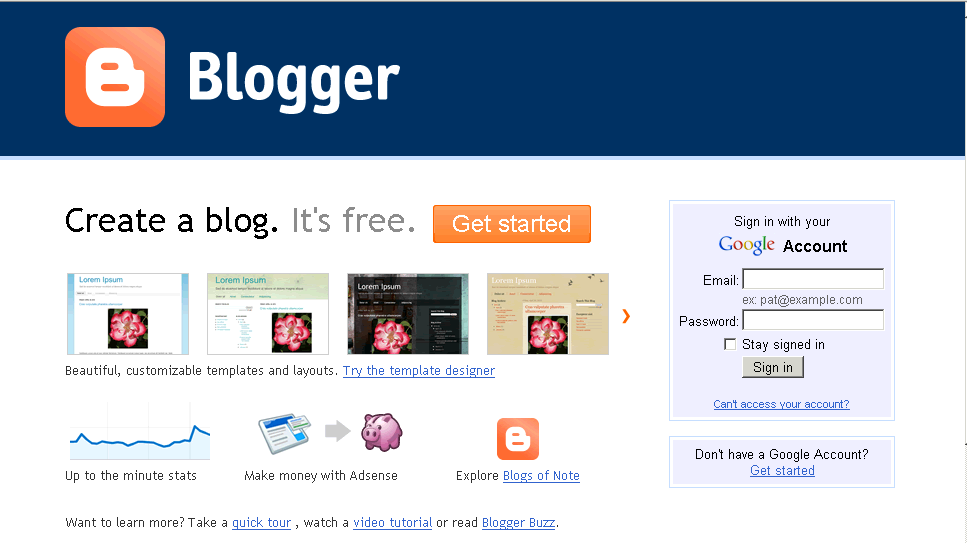
1. goto http://www.blogspot.com/
2. if you have Google account then you "sign in", if not you can create the Google account for free.
3. after sign in you will see step 1, you just fill your name then go next step.

4. you will come to main page., at this place you can manage your blog easier., if you don't have yet 1 , click on button "create your blog now"
5. at here you put the "title" of your blog, and the put the name of your blog, you should select a good name that has some meaning to what you will write in your blog. , when you selected click on "Check Availability" to be sure that name is not in-use.
6. now you have your own blog and ready for design.
Subscribe to:
Posts (Atom)